
Prevue GE3.1.3 - App Store
You'll be able to see results in few seconds.
Publisher Description
Prevue GE
Description:
IMPORTANT NOTE: Prevue GE is a comprehensive mobility solution delivered to you by your organization. Please contact your IT administrators to better understand which capabilities have been enabled for your particular environment.
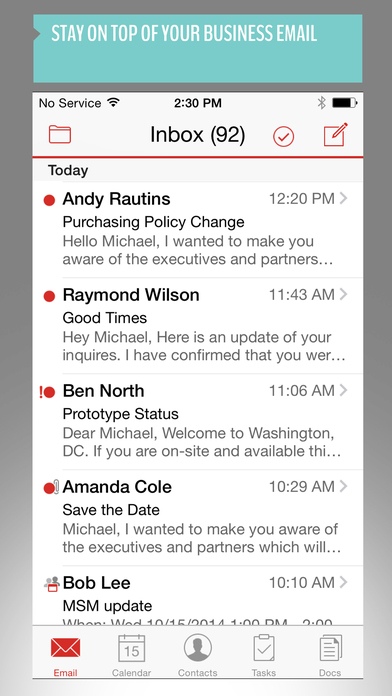
Prevue GE securely manages data and devices and accelerates day one employee productivity with secure email, calendar information, contacts details, browser access, tasks management, and document data. Good for Enterprise increases employee productivity without compromising security, employee privacy or the personal user experience on the device. From a single application, employees can access corporate email, calendar, Intranets, documents, an enterprise app catalog and more. It also integrates mobile device management (MDM) and mobile application management (MAM) capabilities, giving IT complete visibility and control of the mobile deployment.
For employees, Prevue GE lets you work when and where you need to. Get more done with mobile access to critical business applications and information. Because Prevue GE cleanly separates personal and business data, your personal content stays private. You can freely use native device features and personal apps while complying with corporate security requirements.
For corporate IT, Prevue GE protects corporate data in motion, in use and at rest using government grade encryption. With a unique container-based approach, it allows IT to set granular security policies at the application level, such as strong password requirements and control of data sharing with other Good-secured apps or cloud-based services. IT can also remote wipe or lock corporate data while preserving personal information.
End user features include:
Email
Improve collaboration by easily composing or replying to messages
Find specific emails by sorting or filtering message by date, sender, subject, priority, unread and flag
Improve responsiveness by viewing, editing and sending attachments
Speed-up decisions by taking and sending pictures from meetings or job sites
Manage your Inbox by flagging emails for follow-up
Access all your emails with the personal subfolder sync
Set out-of-office auto-reply from anywhere
Calendar
Improve efficiency by scheduling meetings anywhere, anytime
Reduce scheduling headaches with free/busy look-up
Simplify joining conference calls with one-touch conference dialing
Prepare for meetings by reviewing meeting attachments
Reply to meeting invitations as accept, decline or tentative
* Reply, Reply-all and forward
Contacts
Search for contacts in personal contacts and corporate directory
View map and driving directions with a single touch
Tasks / To Dos
Stay Organized with real-time sync of Tasks or ToDos
Create, view and edit Tasks or ToDo items, including due date and priority
Additional Features
Access Intranets and other web-based apps with an integrated browser
Save and access documents and photos in a secure file repository
Personalize your experience with a customizable navigation bar
Integration with other Good and Good-secured mobile apps
Want to connect with other Good users? Join the Good Community, (https://community.good.com/welcome). It s a great resource for Good mobile users and IT administrators to connect and share tips and experience.
Got feedback or a feature suggestion? Email us at iphonebeta@good.com.
Requires iOS 7.0 or later. Compatible with iPhone, iPad, and iPod touch.
About Prevue GE
The company that develops Prevue GE is Good Technology. The latest version released by its developer is 3.1.3.
To install Prevue GE on your iOS device, just click the green Continue To App button above to start the installation process. The app is listed on our website since 2013-01-31 and was downloaded 0 times. We have already checked if the download link is safe, however for your own protection we recommend that you scan the downloaded app with your antivirus. Your antivirus may detect the Prevue GE as malware if the download link is broken.
How to install Prevue GE on your iOS device:
- Click on the Continue To App button on our website. This will redirect you to the App Store.
- Once the Prevue GE is shown in the iTunes listing of your iOS device, you can start its download and installation. Tap on the GET button to the right of the app to start downloading it.
- If you are not logged-in the iOS appstore app, you'll be prompted for your your Apple ID and/or password.
- After Prevue GE is downloaded, you'll see an INSTALL button to the right. Tap on it to start the actual installation of the iOS app.
- Once installation is finished you can tap on the OPEN button to start it. Its icon will also be added to your device home screen.
Program Details
System requirements
Download information
Pricing
Version History
version 3.1.3
posted on 2013-01-31
Disclaimer
Official App Store Link
We do not host Prevue GE on our servers. We did not scan it for viruses, adware, spyware or other type of malware. This app is hosted by Apple and passed their terms and conditions to be listed there. We recommend caution when installing it.
The App Store link for Prevue GE is provided to you by apps112.com without any warranties, representations or guarantees of any kind, so access it at your own risk.
If you have questions regarding this particular app contact the publisher directly. For questions about the functionalities of apps112.com contact us.
